
Choosing the right AI writing tools can make everyday writing faster, clearer, and easier. Whether you need to prepare emails, social media posts, blog articles, product descriptions, reports, or simple messages, the right AI assistant can help turn rough ideas into polished content. The best choice depends on what you write, how often you write, and the type of support you need.
This guide compares seven popular AI writing tools for everyday use. It explains what each platform does best, where it can fit into your workflow, and what to consider before relying on AI-generated content.
7 AI Writing Tools Worth Considering in 2026
- ChatGPT: Best overall for drafting, brainstorming, rewriting, and general writing.
- Grammarly: Best for grammar, proofreading, clarity, and tone.
- Claude: Strong for detailed writing, editing, and longer documents.
- Google Gemini: Convenient for users working with Google’s productivity ecosystem.
- QuillBot: Useful for paraphrasing, rewriting, and alternative wording.
- Jasper: Designed mainly for marketing and business content.
- Microsoft Copilot: Useful for writing assistance within Microsoft-focused workflows.
What Are AI Writing Tools?
AI writing tools are software applications that use artificial intelligence to assist with creating, editing, rewriting, summarizing, and organizing written content. Depending on the platform, they can generate drafts, improve sentence structure, adjust tone, suggest ideas, and turn notes into readable content.
These tools work best as writing assistants rather than complete replacements for human judgment. Users still need to provide useful context, review the output, check important facts, and make sure the final content matches the intended audience.
1. ChatGPT for Flexible Everyday Writing
ChatGPT is a versatile option for people who want one AI assistant for several writing tasks. It can help with brainstorming, drafting, rewriting, summarizing, outlining, and adapting content for different audiences.
You can use it to prepare a professional email, develop blog ideas, rewrite a product description, simplify complicated information, or organize notes into a structured document.
Best for: Emails, blog posts, social media content, brainstorming, summaries, proposals, product descriptions, and general writing.
Main strengths:
- Flexible drafting and editing
- Useful for brainstorming and outlining
- Can adapt tone and writing style
- Works with rough notes and ideas
- Suitable for short and long writing tasks
Limitation: Important facts, figures, names, and claims should be checked before publication or sharing.
2. Grammarly for Editing and Proofreading
Grammarly is particularly useful when you already have a draft and want to improve its grammar, clarity, readability, and tone. Its AI features can also assist with rewriting and generating content.
It can be especially helpful for professionals who regularly prepare emails, reports, business messages, applications, and other workplace communication.
Best for: Grammar, proofreading, emails, professional communication, tone, and rewriting.
Main strengths:
- Grammar and spelling assistance
- Clarity and tone suggestions
- Useful rewriting features
- Helpful for professional communication
- Simple editing workflow
Limitation: Grammarly is primarily an editing and communication assistant rather than a complete content-production platform.
3. Claude for Detailed and Long-Form Content
Claude can be useful for writers working on detailed documents, reports, explanations, and longer pieces of content. It can help organize information, develop ideas, revise drafts, and follow complex writing instructions.
Writers can use it when a project requires considerable context or when several pieces of information need to be organized into a coherent document.
Best for: Long-form content, reports, detailed explanations, document editing, and structured writing.
Main strengths:
- Useful for detailed instructions
- Strong long-form writing workflow
- Helpful for organizing complex ideas
- Useful for editing and refinement
Limitation: Generated information should still be reviewed for accuracy, relevance, and tone.
4. Google Gemini for Everyday Productivity
Google Gemini can be a convenient choice for users who already depend on Google’s productivity services. It can assist with brainstorming, drafting, summarizing, rewriting, and other everyday writing tasks.
Its biggest advantage for some users is workflow convenience. People who already use Google’s ecosystem may find it useful for integrating AI assistance into their regular productivity habits.
Best for: Everyday writing, summaries, brainstorming, rewriting, and Google-centered workflows.
Main strengths:
- General writing assistance
- Useful brainstorming support
- Helpful for summaries and rewriting
- Convenient for Google-focused users
Limitation: Features and availability can vary depending on the account, product, and region.
5. QuillBot for Paraphrasing and Rewriting
QuillBot is focused heavily on paraphrasing and rewriting. It can help create alternative versions of sentences, improve readability, and change wording while keeping the original idea intact.
This can be useful when a sentence sounds repetitive, difficult to understand, or unnecessarily complicated.
Best for: Paraphrasing, rewriting, sentence improvement, and alternative wording.
Main strengths:
- Focused paraphrasing workflow
- Useful for alternative wording
- Helpful for improving sentence structure
- Convenient for quick rewriting tasks
Limitation: Rewritten content should always be compared with the original to ensure the intended meaning has not changed.
6. Jasper for Marketing and Business Content
Jasper is designed more specifically for marketing and business writing than general everyday communication. It can be useful for marketers and teams producing promotional copy, campaign content, brand messaging, and other commercial materials.
For occasional writing, a general-purpose AI assistant may be sufficient. However, teams creating marketing content regularly may prefer a platform built around business content workflows.
Best for: Marketing teams, campaign copy, business content, and brand-focused writing.
Main strengths:
- Marketing-focused workflow
- Useful for repeated content creation
- Suitable for business teams
- Helpful for promotional content
Limitation: Its specialized features may be more than casual users need.
7. Microsoft Copilot for Microsoft Users
Microsoft Copilot can be useful for people who regularly work within Microsoft’s productivity environment. It can assist with drafting, rewriting, summarizing, and organizing information depending on the available product and account.
For professionals already using Microsoft applications as part of their daily workflow, an integrated AI assistant can reduce the need to move information between separate writing platforms.
Best for: Workplace writing, Microsoft-focused productivity, drafting, summarizing, and rewriting.
Main strengths:
- Useful for workplace writing
- Convenient for Microsoft-focused workflows
- Helpful for summaries and drafts
- Can support routine productivity tasks
Limitation: Available capabilities can depend on the Microsoft product, account, subscription, and organization.
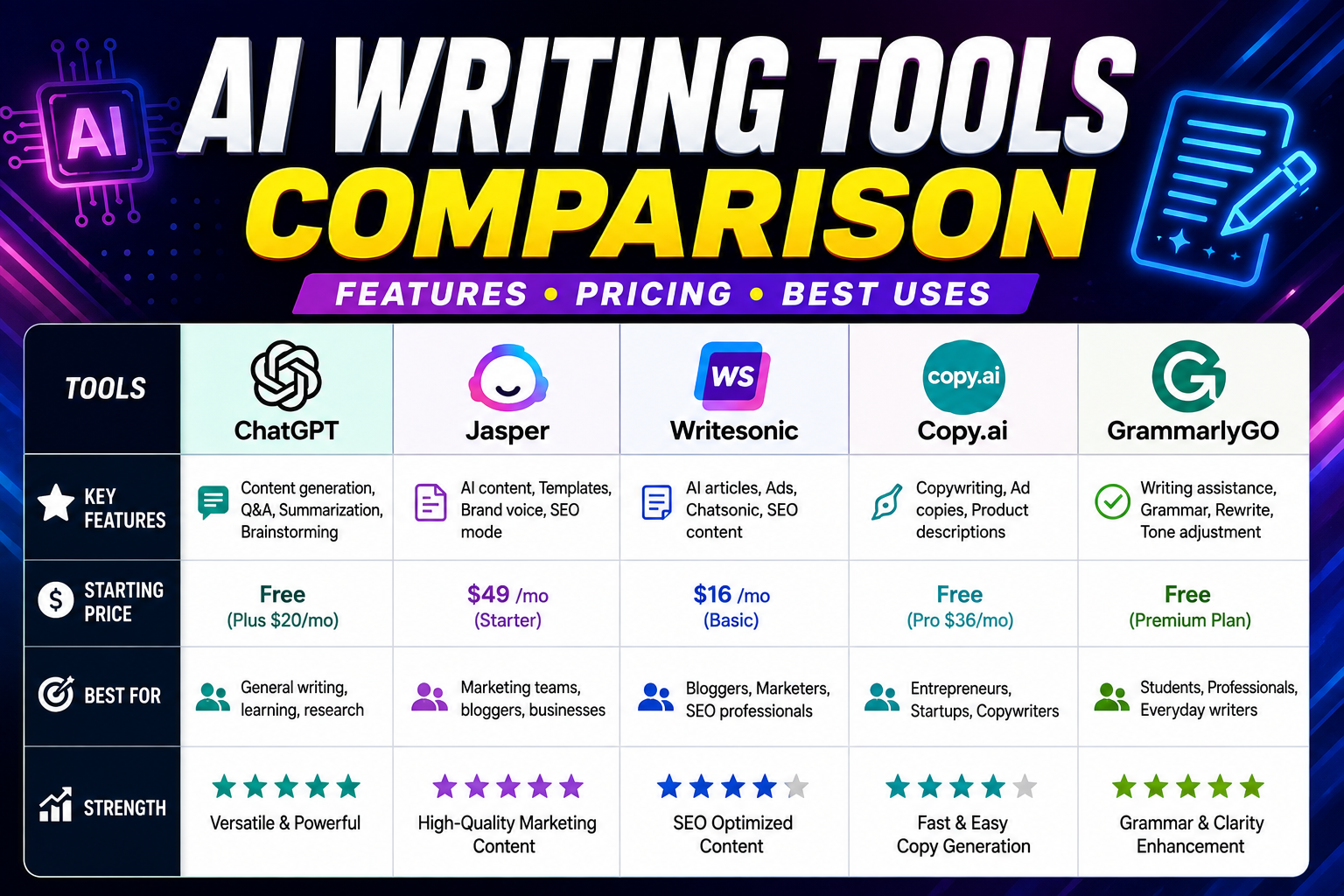
AI Writing Tools Comparison
| Tool | Best For | Strongest Use |
|---|---|---|
| ChatGPT | General users | Drafting and brainstorming |
| Grammarly | Professionals and students | Editing and proofreading |
| Claude | Long-form writers | Detailed writing |
| Google Gemini | Google users | Everyday productivity |
| QuillBot | Writers and students | Paraphrasing |
| Jasper | Marketers | Marketing content |
| Microsoft Copilot | Microsoft users | Workplace writing |
How to Choose the Best AI Writing Tool
The right AI writing tool depends on your writing habits and the type of assistance you need. Instead of choosing a platform simply because it has many features, identify the main problem you want AI to solve.
- Creating content from scratch: ChatGPT or Claude can be useful.
- Improving an existing draft: Grammarly is a strong option.
- Frequent paraphrasing: QuillBot may be more suitable.
- Using Google services daily: Gemini can fit naturally into your workflow.
- Creating marketing content: Jasper may be worth considering.
- Working primarily with Microsoft products: Copilot can provide useful workflow support.
How to Get Better Results From AI Writing Tools
The quality of AI-generated writing depends heavily on the instructions you provide. A vague request such as “write an article” often produces generic content. A more detailed prompt gives the tool useful context about the task.
1. Explain the Goal
Tell the AI exactly what you want to achieve. Instead of asking it to “write an email,” explain that you need a short professional message requesting approval from a client.
2. Identify the Audience
Tell the tool who will read the content. A customer email, internal report, job application, and beginner-friendly article should all use different language and levels of detail.
3. Set the Tone
Specify whether you want the writing to sound professional, friendly, conversational, concise, confident, technical, or simple.
4. Provide Useful Context
Give the AI your key points, facts, examples, background information, and any important requirements. More relevant context usually leads to more useful output.
5. Treat the First Draft as a Starting Point
Review the first version and ask for targeted improvements. You can request shorter paragraphs, clearer wording, a different tone, better organization, or stronger headlines.
6. Verify Important Information
Always check dates, statistics, names, technical information, quotations, product details, and other facts that could affect a reader’s decision.
A Practical AI Writing Workflow
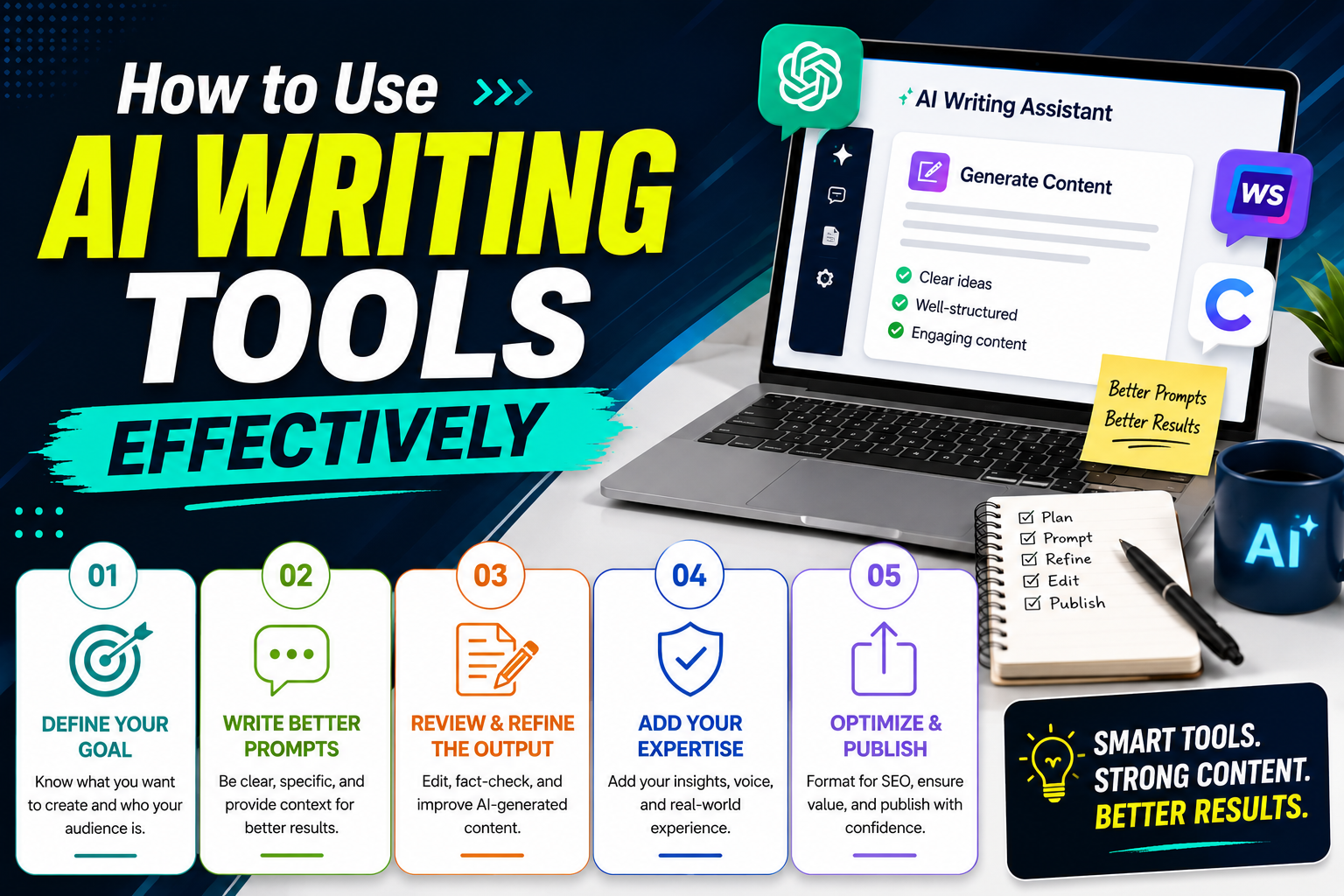
A simple workflow can help you use AI writing tools without losing your own judgment or writing style.
- Plan: Decide what you want to communicate.
- Outline: Identify the main points.
- Draft: Use AI to create an initial version.
- Review: Check accuracy and relevance.
- Edit: Add your own voice and remove unnecessary wording.
- Proofread: Check grammar, spelling, and formatting.
- Finalize: Review the complete piece before publishing or sending it.
Common Mistakes to Avoid With AI Writing
Using the Same Prompt for Every Task
Different writing projects require different instructions. Include the purpose, audience, tone, format, and important details when they matter.
Publishing AI Content Without Reviewing It
AI-generated content should be treated as a draft until you have checked its accuracy, clarity, usefulness, and originality.
Removing Your Personal Voice
AI should help improve your writing rather than erase your personality. Add your own examples, experience, opinions, and preferred wording where appropriate.
Relying on Too Many Platforms
You do not need a separate application for every writing task. For many users, one general-purpose assistant combined with a reliable editing tool can cover most everyday needs.
Simple Tips for Using AI Writing Tools
- Give the AI a short example of the writing style you want.
- Explain what should be included and what should be avoided.
- Ask for several headline or introduction options when useful.
- Use AI to organize ideas before creating long content.
- Keep important factual information under human review.
- Edit the final draft so it reflects your own voice.
- Use specialized platforms only when they solve a specific writing problem.
Frequently Asked Questions About AI Writing Tools
What are the best AI writing tools for everyday use?
The best AI writing tools depend on your needs. ChatGPT is a strong general option, Grammarly is useful for editing, Claude works well for detailed writing, QuillBot focuses on paraphrasing, Gemini fits Google-centered workflows, Jasper targets marketing content, and Copilot can support Microsoft-focused productivity.
Are AI writing tools free?
Many platforms offer free access or limited free features, while advanced capabilities may require a paid subscription. Features, limits, and pricing can change, so check the provider’s official website before subscribing.
Can AI writing tools replace human writers?
AI can automate many parts of the writing process, but human judgment remains important for accuracy, originality, context, personal voice, and final editorial decisions.
How can I make AI-generated writing sound natural?
Provide clear context, define the audience and tone, and give examples of the style you prefer. After generating the draft, remove generic phrases, add specific details, and edit the content using your natural voice.
Which AI writing tool is best for grammar?
Grammarly is a strong option for grammar, clarity, tone, and proofreading because its workflow is specifically designed to improve written communication.
Should I use more than one AI writing tool?
You can, but you do not need to. For many users, one general writing assistant combined with a dedicated proofreading or editing tool is enough for everyday writing.
The most useful AI writing tools are the ones that fit naturally into your workflow and solve a specific writing problem. ChatGPT can provide broad writing assistance, Grammarly can strengthen existing drafts, and specialized platforms such as QuillBot, Jasper, Gemini, Claude, and Copilot can be useful for particular needs.
Rather than letting AI make every writing decision, use it as an assistant.